
Tuples
Tuples in Python are one of the important built-in data structures in Python programming.
They are similar to lists, but there is one major difference:
Tuples cannot be changed once created
This feature makes tuples useful for storing fixed and secure data.
Tuples are widely used in:
- banking systems
- student records
- GPS coordinates
- date and time storage
- database applications
What is a Tuple
A tuple is a collection of items that is ordered but immutable.
-
Immutable: This is a fancy coding word that means "cannot be changed." Once you create a tuple, you cannot add, remove, or edit the items inside it.
-
Parentheses: We create tuples using ( ) brackets instead of square ones.
-
Secure: Because they can't be changed, tuples are faster and safer than lists!
Difference Between List and Tuple Syntax
| Data Structure | Syntax |
|---|---|
| List | [ ] |
| Tuple | ( ) |
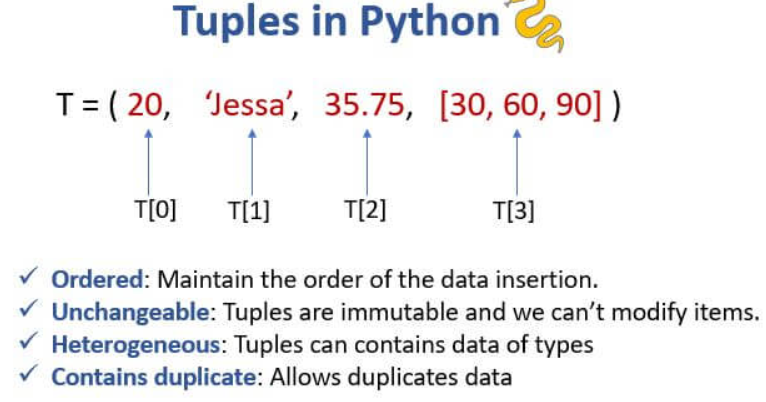
Why Tuples are Important
Tuples are important because they:
- protect data from modification
- improve program safety
- store fixed collections
- use less memory than lists
- improve program performance
Real-World Tuple Scenarios
-
Days of the Week: (Monday, Tuesday, Wednesday...) — these never change!
-
RGB Colors: (255, 0, 0) — fixed values that make up a specific color.
-
Map Coordinates: (Latitude, Longitude) — a fixed location on a map.
-
Student ID: A unique number given to you that stays the same all year.
Syntax
tuple_name = (item1, item2, item3)
Example 1: Creating a Tuple
colors = ("red", "green", "blue")
print(colors)
Output:
('red', 'green', 'blue')
Example 2: Accessing an Item
numbers = (10, 20, 30)
print(numbers[1])
Output:
20Example: Mixed Data Tuple
Tuples can store different data types together.
data = ("Python", 10, 15.6, True)

print(data)

print(type(data))
Output
('Python', 10, 15.6, True)

<class 'tuple'>
Tuple Indexing in Python
Tuples support:
- positive indexing
- negative indexing
Difference Between List and Tuple
| List | Tuple |
|---|---|
Uses [ ] |
Uses ( ) |
| Mutable | Immutable |
| Values can change | Values cannot change |
| More flexible | More secure |
| Uses more memory | Uses less memory |
Pro Tip: If you absolutely must change a tuple, you have to convert it into a list, change it, and then convert it back into a tuple. It's like opening the time capsule, swapping a toy, and resealing it!
Real-Time Applications of Tuples
| Application | Usage |
|---|---|
| Date of Birth | Fixed values |
| GPS Coordinates | Latitude and longitude |
| Database Records | Read-only data |
| RGB Color Codes | Fixed color values |
| Banking Systems | Secure transaction records |
Advantages of Tuples
- faster than lists
- secure data storage
- memory efficient
- supports indexing and slicing
- useful for fixed data
Common Beginner Mistakes
| Mistake | Problem |
|---|---|
| Forgetting comma in single-item tuple | Treated as int |
| Trying to modify tuple | TypeError |
| Confusing list and tuple brackets | Wrong syntax |
| Wrong indexing | IndexError |
Summary:
-
Safety First: Use tuples when you want to make sure nobody accidentally changes your data.
-
Speedy: Computers can read tuples faster than lists.
-
Duplicates: Tuples don't mind if you have the same item twice!
is an ordered and immutable collection in Python.
Important concepts include:
- tuple syntax
- indexing
- slicing
- immutability
- tuple packing
- tuple unpacking