
Sets
A set is a collection of unique values stored together.
Sets are one of the important built-in data structures in Python programming.
A set is used to store multiple values together, but unlike lists and tuples, sets store only unique values.
Sets are very useful when we want to:
- remove duplicate values
- perform membership checking
- store unordered collections
- manage unique records efficiently
What is a Set
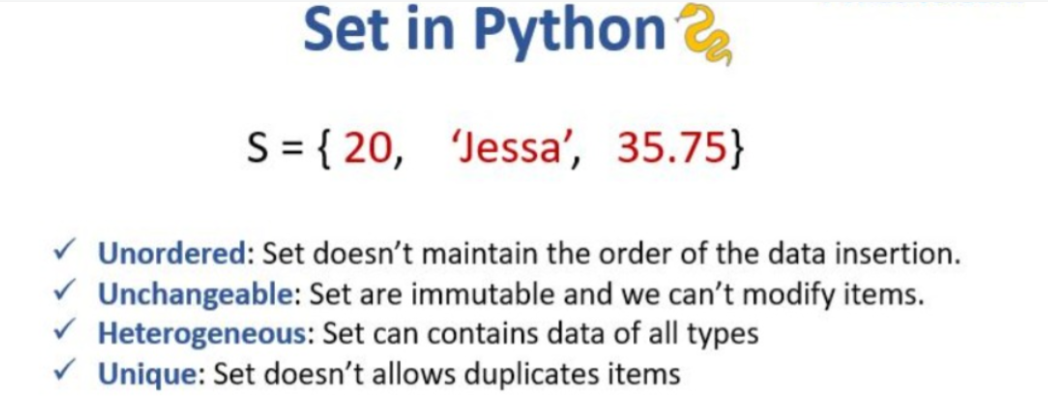
A set is a collection that is unordered, unindexed, and most importantly, only contains unique items.
-
No Duplicates: If you try to add the same number twice, the set will automatically delete the extra one.
-
Curly Braces: We create sets using { } brackets.
-
Unordered: Python doesn't remember what order you put things in. It's like a messy toy box—everything is in there, but not in a neat line.
-
No Index: Since there is no order, you cannot ask for "item number 0."
- Are mutable
Why Sets are Important
Sets are important because they help programmers:
- remove duplicate values automatically
- perform fast searching
- manage unique data efficiently
- improve program performance
- handle membership checking quickly
Real-World Set Scenarios
-
Student IDs: Making sure no two students have the same ID number.
-
Data Cleaning: Taking a long list of words and removing all the repeats.
-
Common Interests: Finding which hobbies two friends both share (Intersection).
-
Website Tags: Managing a list of unique tags for a blog post.
Syntax
set_name = {item1, item2, item3}Important Points About Sets
- sets use curly brackets
{ } - items are separated using commas
- duplicate values are not allowed
- sets are unordered
Example 1: Removing Duplicates Automatically
nums = {1, 2, 2, 3}
print(nums)
Output:
{1, 2, 3}Example 2: Finding Common Items (Intersection)
a = {1, 2, 3}
b = {3, 4, 5}
print(a & b)
Output:
{3}Important Point
The display order may change because:
Sets are unordered
Membership Operators in Set
Python provides:
innot in
for membership checking.
Example
set1 = {"apple", "banana", "mango"}

print("banana" in set1)

print("banana" not in set1)

print("orange" in set1)

print("orange" not in set1)
Output
True
False
False
True
Explanation
| Condition | Result |
|---|---|
"banana" in set1 |
True |
"banana" not in set1 |
False |
"orange" in set1 |
False |
"orange" not in set1 |
True |
Difference Between List, Tuple, and Set
| List | Tuple | Set |
|---|---|---|
Uses [ ] |
Uses ( ) |
Uses { } |
| Ordered | Ordered | Unordered |
| Mutable | Immutable | Mutable |
| Allows duplicates | Allows duplicates | No duplicates |
Real-Time Applications of Sets
| Application | Usage |
|---|---|
| Student Roll Numbers | Unique IDs |
| Social Media Systems | Unique usernames |
| Database Systems | Remove duplicate records |
| Search Systems | Fast membership checking |
| Online Registration Systems | Unique user management |
Common Beginner Mistakes
| Mistake | Problem |
|---|---|
Using {} for empty set |
Creates dictionary |
| Expecting ordered output | Sets are unordered |
| Trying duplicate storage | Duplicates removed |
| Using indexing | Sets do not support indexing |
Advantages of Sets
- automatically removes duplicates
- faster searching
- supports membership operations
- memory efficient for unique data
- easy data management
Summary:
-
Duplicate Destroyer: Use a set whenever you want to get rid of repeat values instantly.
-
Math Magic: Sets are great for "set math" like finding things that are in both groups (Intersection) or combining groups (Union).
-
Speed: Sets are incredibly fast for checking if an item is "in" the collection.
Important concepts include:
- set syntax
- unique values
- add() method
- remove() method
- membership operators
- duplicate removal