List Indexing and Slicing
Lists are one of the most powerful data structures in Python.
To work with list items efficiently, Python provides:
- Indexing
- Slicing
These concepts help programmers access:
- single items
- multiple items
- portions of lists
- reversed lists
What is Indexing in Python?
Indexing
is used to access individual items from a list.
Each item inside a list has a position number called:
Index
Important Point About Indexing
Python list indexing starts from:
0
What is Slicing in Python
Slicing
is used to access:
Multiple items from a list
Instead of getting one item, slicing returns a part of the list.
Slicing is a technique used to extract a portion of a list using index positions.
Difference Between Indexing and Slicing
| Indexing | Slicing |
|---|---|
| Accesses single item | Accesses multiple items |
| Returns one value | Returns part of list |
| Uses single index | Uses start:stop:step |
Example: list[0] |
Example: list[1:4] |
What is List Indexing?
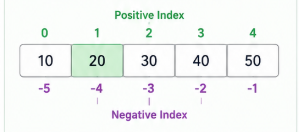
Indexing is used to access one specific item using its position number.
-
Zero-Based: In Python, the first item is always at index 0.
-
Negative Indexing: You can also count backward! The very last item in a list is at index -1.
What is List Slicing?
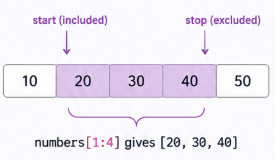
Slicing is used to cut out a specific "slice" or range of items from your list. It uses the colon (:) operator.
-
The Rule: Slicing includes the start index but stops right before the stop index (it is exclusive of the stop value).
Real-World Scenarios
-
Top Scores: Slicing the first 3 items to see the winners.
-
Last Song: Using index -1 to play the final track in a playlist.
-
Recent Items: Slicing the end of a list to see the most recent tasks.
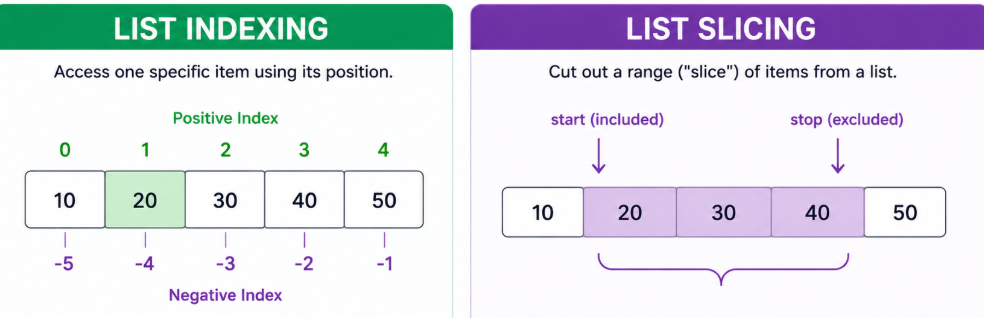
How it Looks like
The Pattern:
list[index]        # Get one item
list[start:stop]   # Get a range of items
Example 1: Basic Indexing
numbers = [10, 20, 30, 40]
print(numbers[1])
Output:
20
Example 2: Slicing a Range
numbers = [10, 20, 30, 40, 50]
print(numbers[1:4])
Output:
[20, 30, 40]Real-Time Applications of Indexing and Slicing
| Application | Usage |
|---|---|
| Student Management System | Access student records |
| Banking Applications | Process transaction history |
| Data Analysis | Extract dataset portions |
| Gaming Applications | Access player data |
| Web Applications | Manage collections |
Advantages
- easy data extraction
- shorter code
- supports reversing
- supports skipping elements
- improves readability
Common Beginner Mistakes
| Mistake | Problem |
|---|---|
| Using wrong index | IndexError |
| Confusing stop index | Missing values |
| Forgetting step value | Incorrect slicing |
| Using invalid negative index | Unexpected output |
Summary:
Indexing and slicing are very important concepts in Python lists.
Indexing
is used to access:
- single items
Slicing
is used to access:
- multiple items
- portions of lists
- reversed lists
Important concepts include:
- positive indexing
- negative indexing
- slicing syntax
- reversing lists
- step values
Indexing and slicing are widely used in:
- school systems
- banking applications
- data analysis
- gaming applications
- web development