if Statement
The if statement in Python is used to execute a block of code only when a specified condition becomes True.
If Statement in Python
The if statement is one of the most important concepts in Python programming.
It helps programs make decisions based on conditions.
In real life, we make decisions every day:
- If marks are greater than 35 → student passes
- If age is greater than 18 → eligible to vote
- If score is greater than 100 → unlock next game level
Similarly, Python programs also use decision-making statements to execute specific code based on conditions.
The simplest decision-making statement in Python is the if statement.
What is an If Statement in Python
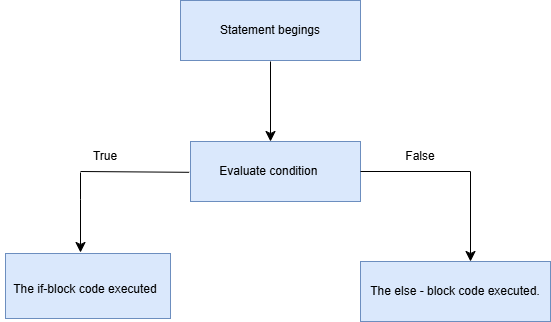
An if statement is a conditional statement used to check whether a condition is True or False.
- If the condition is True, Python executes the code inside the if block.
- If the condition is False, Python skips the block.
Why If Statements are Important
If statements are important because they help programs:
- make decisions
- check conditions
- control program flow
- build interactive applications
- create smart systems
Without if statements, programs cannot respond differently to different situations.
Real-Time Examples of If Statements
| Condition | Action |
|---|---|
| If marks > 35 | Display "Pass" |
| If age > 18 | Eligible to vote |
| If score > 100 | Unlock next level |
| If password is correct | Login successful |
| If balance is sufficient | Allow withdrawal |
What is a Condition?
A condition is an expression that returns either:
TrueFalse
Example:
10 > 5Output:
TrueExplanation
The program checks a condition first.
- If the condition is True → it executes the code
- If the condition is False → it skips the code
It is the simplest decision-making statement in Python programming.
Used when only one action is needed.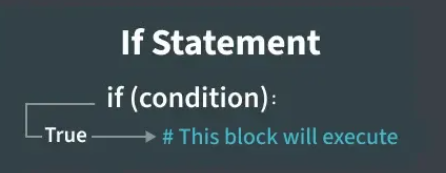
Real-Time Scenarios
- If it is raining → take an umbrella
- If you are hungry → eat food
- If the light is off → switch it on
- If homework is done → play games
- If battery is low → charge phone
Syntax
if condition:
    statements
Example 1
marks = 60
if marks >= 50:
    print("You passed")
Output:
You passedExample 2
marks = 95
if marks > 90:
    print("Excellent!")
Output:
Excellent!Explanation
- marks >= 50 → checks the condition
- If condition is True, Python executes the code
- Otherwise, nothing happens
Common Beginner Mistakes
| Mistake | Problem |
|---|---|
Forgetting colon : |
Syntax error |
| Wrong indentation | Indentation error |
Using = instead of == |
Logical error |
| Mixing data types | Unexpected results |
Summary
The if statement in Python is used for decision making.
It checks whether a condition is True or False.
- If the condition is True → Python executes the if block
- If the condition is False → Python skips the block
Important concepts in if statements include:
- conditions
- indentation
- colon usage
- Boolean values
If statements are widely used in real-world applications such as games, login systems, banking software, and student result systems.
Learning if statements is one of the most important steps in Python programming.