Operators & Decision Making
Operators and Decision Making in Python help us perform operations and make decisions in a program.
They are very important concepts in Python programming for beginners.
What are Operators?
Operators in Python are symbols used to perform operations on values.
They help in:
- Calculations (Arithmetic Operators)
- Comparisons (Comparison Operators)
- Logic building (Logical Operators)
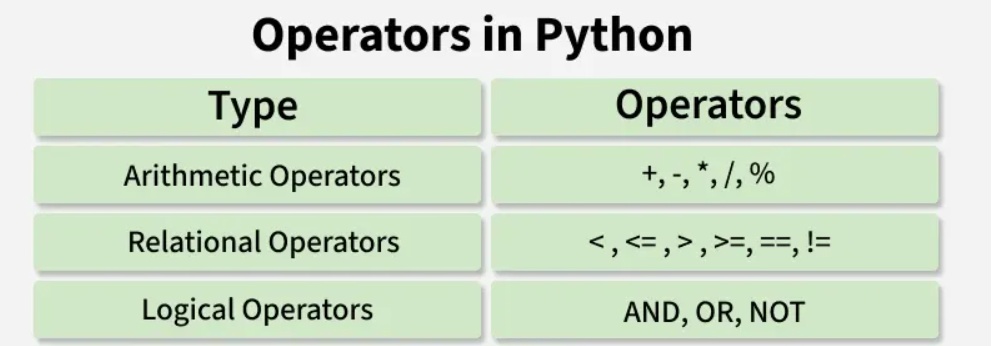
Types of Operators
1. Arithmetic Operators
Used to perform calculations:
- + → Addition
- - → Subtraction
- * → Multiplication
- / → Division
2. Comparison Operators(Relational)
Used to compare values:
- == → Equal
- > → Greater than
- < → Less than
3. Logical Operators
Used to combine conditions:
- and → Both conditions must be True
- or → At least one condition is True
- not → Reverses the result
What is Decision Making?
Decision Making in Python means choosing an action based on a condition.
It is done using:
ifelseelif
It helps programs:
- Decide what to do next
- Work based on True or False conditions
Example Program (Operators + Decision Making)
marks = 75

if marks >= 50:
    print("Pass")
else:
    print("Fail")
Output:
Pass
Explanation
- marks >= 50 → Comparison operator checks condition
- if → makes a decision based on condition
- Output depends on True/False result
Common Beginner Mistakes
- Using = instead of ==
- Missing colon (:) after if
- Wrong indentation
- Incorrect conditions
➤ Summary
Operatorsperform calculations and comparisonsDecision Makinguses conditions- if, else, elif control program flow
- Works based on True or False
- Used in real-world programs
➤ Tips
- Practice simple if conditions
- Use correct operators
- Understand True/False logic
- Try real-life examples