for Loop
A for loop is a looping statement used to execute a block of code repeatedly over a sequence of values.
- The loop uses a
loop variablethat changes value in each step - It works with sequences like numbers, lists, or strings
- The
range()function is commonly used with for loops - It makes programs shorter and avoids repeated code
Explanation
-
The for loop is one of the most important looping statements in Python programming.
It is used to repeat a block of code multiple times automatically.Instead of writing the same code again and again manually, Python allows programmers to repeat tasks easily using loops.
For loops are widely used in:
- printing numbers
- displaying messages
- generating tables
- processing student records
- game development
- automation tasks
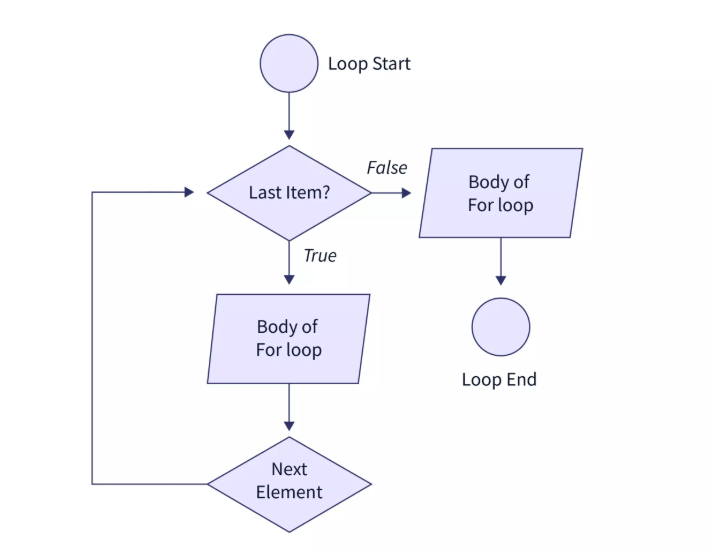
Step-by-Step Explanation of the Flowchart
1. Loop Start
The loop begins from the Start point.
The program prepares to check the elements in the sequence.
Example:
range(5)Sequence:
0,1,2,3,42. Last Item
The decision box checks:
“Is this the last item in the sequence?”
There are two possibilities:
False
If it is not the last item:
- The loop executes the body of the loop.
- The statements inside the loop run.
3. Body of For Loop
This block contains the code that should repeat.
Example:
print(i)The loop performs the required task for the current element.
4. Next Element
After executing the loop body:
- The loop moves to the next element.
- Again it checks whether it is the last item or not.
This process repeats continuously.
5. True Condition
When the last item is reached:
- The condition becomes True
- The loop stops repeating.
6. Loop End
The loop terminates and control moves outside the loop.
Program execution continues with the next statement after the loop.
Simple Flow Summary
Start
   ↓
Check Item
   ↓
Execute Loop Body
   ↓
Move to Next Item
   ↓
Repeat Until Last Item
   ↓
End
Important Points About For Loop
- for loop repeats code automatically.
- It works with sequences like:
- lists
- strings
- tuples
- range()
- It reduces code repetition.
- It improves program readability.
Real-Life Scenario
- Teacher calling roll numbers from 1 to 30
- Printing numbers from 1 to 10
- Showing marks of students one by one
Instead of writing print() many times, we use a loop
Syntax
for variable in range(start, end):
    # code
Example 1
for i in range(1, 6):
    print(i)
Output
1
2
3
4
5
Example 2
total = 0

for i in range(1, 6):
    total = total + i

print(total)
Output
15
Explanation of Example
range(1, 6)→ gives numbers 1 to 5- Loop adds all numbers → 1+2+3+4+5 = 15
Why for loop is Important
-
For loops are important because they help programmers:
- reduce repeated code
- automate repetitive tasks
- improve program readability
- save development time
- process collections of data easily
Common Beginner Mistakes
- Forgetting that end value is not included
- Wrong indentation
- Using wrong range values
- Not understanding loop flow
➤ Summary
The for loop in Python is used to repeat a block of code multiple times automatically.
Important concepts include:
range()function- sequences
- nested loops
- multiplication tables
- odd and even numbers