String Methods
String Methods in JavaScript are built-in functions used to perform operations on strings.
They help programmers modify, search, extract, and manipulate text data easily.
String methods make coding faster, cleaner, and more efficient in JavaScript programs.
JavaScript provides many useful string methods like length, toUpperCase(), toLowerCase(), slice(), and replace().
These methods are widely used in web development, forms, search systems, and applications.
Learning string methods helps students improve their JavaScript and text-processing skills.
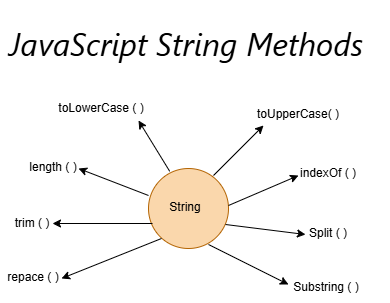
Common String Methods in JavaScript
| String Method | Purpose |
|---|---|
| toLowerCase() | Converts all characters into lowercase letters |
| toUpperCase() | Converts all characters into uppercase letters |
| indexOf() | Finds the position of a character or word in a string |
| split() | Splits a string into an array |
| substring() | Extracts part of a string between two positions |
| replace() | Replaces existing text with new text |
| trim() | Removes extra spaces from the beginning and end |
| length() | Returns the total number of characters in a string |
Why Use String Methods?
String methods provide several benefits:
- Simplify text manipulation
- Improve code readability
- Reduce development time
- Support text formatting
- Improve user experience
- Process user input efficiently
Explanation of String Methods
- String Methods help manipulate and manage text data in JavaScript.
- They make programs more interactive and user-friendly.
- Methods like toUpperCase() convert text into capital letters.
- Methods like slice() extract part of a string.
- String methods improve code readability and efficiency.
- They are widely used in websites, games, forms, and applications.
- JavaScript string methods simplify text processing tasks.
Difference Between Common String Methods
| Method | Purpose | Returns New Value |
| toUpperCase() | Converts text to uppercase | Yes |
| toLowerCase() | Converts text to lowercase | Yes |
| replace() | Replaces text | Yes |
| trim() | Removes spaces | Yes |
| split() | Converts string to array | Yes |
| indexOf() | Finds position | Yes |
| substring() | Extracts text | Yes |
| length | Counts characters | No (Property) |
Real-Time Scenarios of String Methods
- Login forms use string methods to validate usernames and passwords.
- Search engines use string methods to process search keywords.
- Social media apps use string methods for comments and messages.
- Educational websites use string methods for quiz answers and text formatting.
- Banking applications use string methods to manage customer information.
- Shopping websites use string methods for product search and filtering.
- Chat applications use string methods for message formatting and processing.
Syntax
stringName.toUpperCase();

stringName.slice(start, end);

stringName.replace("old", "new");
Example
let text = "JavaScript";

console.log(text.toUpperCase());
console.log(text.toLowerCase());
console.log(text.indexOf("S"));
Output
JAVASCRIPT
javascript
4
Advantages of String Methods
- Simplify text processing
- Improve code readability
- Reduce coding effort
- Support dynamic applications
- Increase development speed
- Improve user experience
- Handle text efficiently
Summary
String Methods in JavaScript are powerful built-in functions used to manipulate, search, format, and process text data efficiently. Methods such as toUpperCase(), toLowerCase(), indexOf(), split(), substring(), replace(), trim(), and length help developers handle text quickly and effectively. These methods are widely used in login systems, search engines, social media applications, educational platforms, banking software, and e-commerce websites. Mastering string methods is essential for building interactive and professional JavaScript applications.
Keywords
String Methods in JavaScript, JavaScript String Functions, JavaScript String Manipulation, toUpperCase JavaScript, toLowerCase JavaScript, JavaScript replace Method, JavaScript split Method, JavaScript substring Method, JavaScript trim Method, JavaScript String Tutorial, Learn JavaScript Strings, Frontend Development, JavaScript Programming Basics, JavaScript Interview Questions